Celson Review: A Sharp Sans Serif for Modern Branding
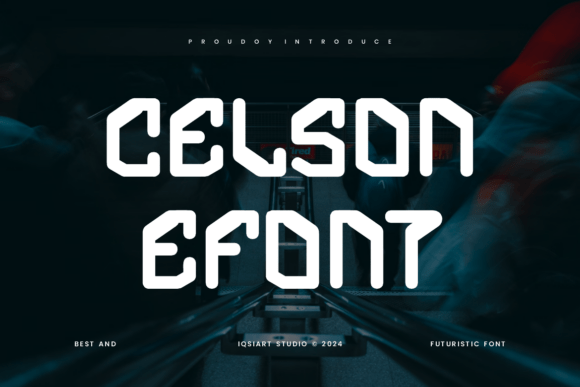
When a new sans serif font lands on my desk, I don't just look at the glyph shapes; I immediately start imagining where it lives in the real world. Does it belong on a coffee cup sleeve, a tech startup's landing page, or a high-end fashion lookbook? My first impression of Celson was that it strikes a rare balance between geometric precision and human warmth. It doesn't scream for attention with exaggerated quirks, nor does it fade into the background like a generic system font. Instead, it offers a confident, clean visual personality that feels ready for serious brand identity work.
The mood Celson creates is one of modern efficiency mixed with approachability. The letterforms feel sturdy, with open apertures that ensure clarity even when scaled down. There is a distinct lack of unnecessary ornamentation, which gives it a timeless quality. This makes it an excellent candidate for projects requiring a premium feel without leaning into the coldness often associated with strict geometric typefaces. For designers and small business owners looking to establish trust, this subtle nuance is crucial. It suggests professionalism while remaining inviting to the audience.
Putting Celson to Work in Real Projects
In practical application, Celson shines across a diverse range of mediums. I tested it extensively for logo design, and found that its balanced stroke weights hold up exceptionally well as a brand mark. Whether used in all-caps for a bold statement or in sentence case for a softer touch, the kerning feels naturally spacious, reducing the need for manual tweaking during the vectoring process. For packaging design and product labels, the font's legibility is a major asset. On a crowded shelf, clarity is king, and Celson ensures that product names and key details pop against complex backgrounds.
Beyond physical goods, this typeface performs admirably in digital environments. For web design, specifically in website headers and navigation menus, Celson provides a crisp rendering that looks sharp on both retina displays and standard screens. Content creators and bloggers will appreciate how it handles short phrases and pull quotes within editorial layouts. It adds a layer of sophistication to blog graphics and social media posts without overpowering the imagery. When creating social media graphics for Instagram or LinkedIn, the font's strong vertical presence helps stop the scroll, making it ideal for carousel covers and promotional banners.
I also explored its potential for printable products and DIY crafters using tools like Cricut. Because the shapes are so clean, Celson cuts cleanly from vinyl and cardstock, making it a reliable choice for merchandise, stickers, and custom invitations. For digital sellers creating Canva templates or other design assets, including Celson adds immediate value. It elevates a template from "amateur" to "professional" simply by virtue of its refined proportions. It is a versatile creative font that bridges the gap between corporate necessity and artistic expression.
Strategic Usage and Limitations
While Celson is highly versatile, it is not a one-size-fits-all solution. As a display font primarily, it excels in large headlines, short phrases, and decorative accents. However, designers should exercise caution when using it for long blocks of body text. While readable, its character is best utilized where impact is needed rather than sustained reading. It is perfect for quotes, subheaders, and captions, but pairing it with a more neutral serif or a softer sans serif for the main copy often yields better results in editorial design.
For premium packaging, Celson works beautifully when given room to breathe. Crowding the letters defeats the purpose of its open structure. In brand marks, it serves as a strong foundation, but it may need custom ligatures or unique spacing adjustments to become truly distinctive in a saturated market. When used in digital ads, keep the copy concise. The font commands respect, so let it speak clearly rather than shouting with too much text.
Impact on Readability and Brand Perception
The choice of typography directly influences audience trust and recognition. Celson contributes to a sense of stability and modernity. Its clean lines suggest a brand that is organized, transparent, and forward-thinking. This affects engagement positively; users are more likely to trust information presented in a clear, professional modern typography style. Hierarchy is easily established because the font has enough weight variation to distinguish between levels of importance without needing drastic size changes.
Consistency is key in building a brand, and Celson supports this by maintaining its character across different weights and styles. Whether on a business card or a billboard, the visual mood remains consistent, reinforcing brand recall. For marketers, this means the message stays coherent across channels, from email newsletters to outdoor signage. The professionalism exuded by the font can elevate a small business owner's perceived authority, making their offerings appear more established and reliable.
Practical Notes for Designers
Before committing Celson to a client project, there are several steps I recommend taking. First, test it strictly in black and white. Color can often mask spacing issues, but monochrome reveals the true skeleton of the typeface. Check its readability at small sizes, particularly on mobile devices, to ensure the counters (the enclosed spaces in letters like 'o' and 'e') do not fill in. Always try the font on real mockups rather than just flat screens; seeing how it interacts with texture and lighting provides a more accurate prediction of the final result.
Compare the uppercase and lowercase forms carefully. Celson has a strong uppercase presence, but the lowercase offers a friendlier tone. Decide which aligns better with your brand voice. Experiment with font pairing extensively. Try Celson beside a classic serif font for a traditional yet modern look, or pair it with another sans serif font of contrasting weight for a ultra-contemporary vibe. It also juxtaposes interestingly with a flowing script font or a casual handwritten font, creating a dynamic tension that works well for lifestyle brands.
Finally, and most importantly, confirm the commercial licensing before using it for any commercial font applications. Whether you are designing for a client, selling a digital product, or creating printable design files for resale, understanding the license terms is non-negotiable. Celson is a powerful tool in a designer's arsenal, offering a blend of style and function that can define a brand's visual future. When used with intention and strategic pairing, it transforms good designs into great ones.